



Walk into a busy fast-food restaurant during peak hours — and the first thing you notice is the queue. Guests waiting to order, staff rushing behind the counter, pressure building with every new customer.
This is exactly the kind of bottleneck that self-ordering kiosks are designed to eliminate. What started as a niche solution is now becoming a standard part of modern restaurant operations — especially where speed and volume define success.
In this guide, we’ll explain what self-ordering kiosks are, why restaurants are adopting them, and where they deliver the most value.
What They Are and How They Work
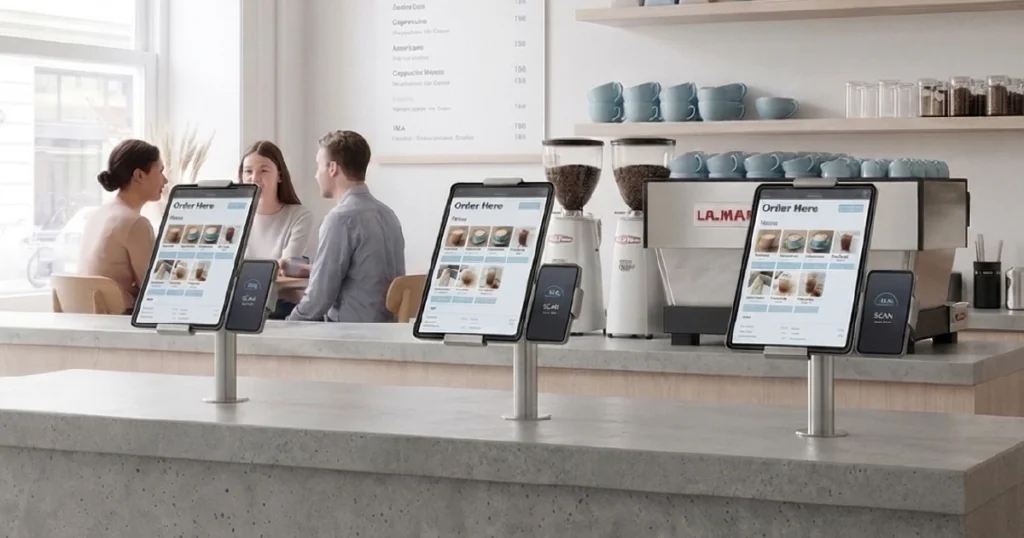
Self-ordering kiosks are touchscreen devices that let guests browse the menu, customize items, place orders, and pay without waiting for a cashier or staff member to take the order manually.
In most restaurants, these kiosks are placed in visible, high-traffic areas such as:
- near the entrance
- next to the counter
- at dedicated ordering stations
- inside food courts or takeaway zones
Unlike a simple digital menu, a kiosk is part of the ordering workflow itself. It is usually connected directly to the restaurant’s POS system, so the order can be sent to the kitchen, KDS, or printers automatically — without delays or manual handoffs.
In practical terms, the kiosk becomes an additional ordering point that works continuously, follows the same rules every time, and does not depend on staff availability. It does not slow down, forget steps, or get overwhelmed during peak hours. For a broader comparison of how this format fits into restaurant operations, see digital ordering systems for restaurants: types, use cases & how they work.
Why Restaurants Are Adopting Kiosks
Restaurants adopt self-ordering kiosks for a simple reason: counter-based ordering breaks the moment demand increases.
When guest traffic increases, the same problems appear again and again:
- guests wait in line before they can order
- staff can only serve one customer at a time
- manual order taking slows the entire flow
- errors become more frequent during busy periods
Even the best team slows down when too many guests arrive at once. A kiosk does not replace the team entirely, but it removes one of the biggest pressure points by allowing multiple guests to start ordering at the same time.
This is why kiosks are especially attractive for venues where throughput matters: every minute a guest spends waiting is a minute you are not serving the next order.
Another factor behind this shift is consistency. Every guest sees the same menu structure, the same upsell prompts, and the same checkout flow. That makes ordering easier to manage operationally — and easier to optimize over time. If you want a wider definition of how kiosks fit into a connected setup, see what a digital ordering system for restaurants is.
Key Benefits of Kiosks
Faster Ordering
Guests do not have to wait for staff to become available. They can start ordering immediately, which reduces queues and improves overall service speed in restaurants.
Higher Average Check
Kiosks consistently apply upselling prompts, combos, and add-ons — similar to structured upselling systems used in digital menus. Unlike human staff, the kiosk never forgets to offer an upgrade or suggest a higher-value option.
Reduced Staff Pressure
Instead of taking every order manually, staff can focus on food preparation, pickup management, and guest support where it matters most — not on repetitive order entry.
Improved Order Accuracy
Orders are entered directly by guests, which reduces miscommunication, missed modifiers, and avoidable manual mistakes — especially during peak hours.
Challenges and Limitations
Initial Setup and Hardware Costs
Kiosks require investment in devices, installation, and maintenance compared to lighter solutions like QR-based ordering.
User Experience Design Matters
If the interface is confusing or too slow, the kiosk creates friction instead of removing it. A well-optimized ordering flow is critical — otherwise the queue simply moves from the counter to the screen.
Not Ideal for Every Venue
Some full-service restaurants or venues built around personal interaction may benefit more from hybrid solutions such as tablet menus or QR ordering at the table. You can also compare these models directly in QR ordering vs self-service kiosk and QR vs kiosk vs tablet ordering.
In other words, kiosks are powerful — but they are not universally the best fit for every service model.
Where They Work Best
Kiosks deliver the most value in environments where speed, consistency, and volume are critical:
- fast food and QSR environments
- food courts and shopping malls
- takeaway-heavy locations
- high-volume venues with peak traffic
- casual concepts where guests are comfortable with self-service
They are especially effective when the goal is to process more orders without expanding the front counter team.
Self-ordering kiosks also work well in venues where guests are already used to self-service behavior, such as quick-service brands, transit locations, stadiums, and large food halls. In these environments, kiosks feel natural rather than disruptive. For a practical decision framework, see how to choose the right ordering system for your restaurant.
In some venues, kiosks are also combined with solutions like QR-based self-ordering points to create multiple entry points for ordering and reduce dependence on a single line or service point.
How Kiosks Fit Into a Modern Ordering System
Self-ordering kiosks are most powerful when they are part of a broader, connected ordering ecosystem rather than a standalone screen in the corner.
In modern restaurant operations, they often work alongside:
- QR-based ordering at tables
- tablet menus for assisted or in-venue service
- mobile-first ordering flows for guests who prefer their own devices
This kind of channel mix gives operators more flexibility. One venue may rely on kiosks for takeaway, QR for table ordering, and tablets for staff-assisted flows — all inside the same operational logic. If you want to see how these formats compare, see QR vs kiosk vs tablet ordering.
This is where kiosks become more than just hardware. They become part of a broader service strategy, helping restaurants match the right ordering channel to the right guest journey instead of forcing every order through the same bottleneck.
Together, these channels create a more resilient service model that adapts to traffic, guest preferences, and venue format — all connected through a unified POS-integrated platform.
In practice, kiosks create the most value when they solve a clearly defined bottleneck — most often queue pressure at the counter or high-volume guest flow. Rather than forcing every guest through the same ordering point, they allow restaurants to distribute demand across multiple channels.
Many venues combine kiosks with QR ordering, tablet menus, and POS-connected workflows to support different service moments without overloading staff or creating new friction. You can also compare kiosk fit against QR in QR ordering vs self-service kiosk.
Conclusion
Self-ordering kiosks are not about replacing staff. They are about removing friction at the exact point where ordering tends to slow down or break. When implemented correctly, they help restaurants serve more guests, reduce queue pressure, and operate with greater consistency.
The real value does not come from the screen alone, but from how the kiosk fits into the broader service workflow.
Want to see how self-ordering kiosks work in a real restaurant setup?
Explore how kiosk ordering, QR menus, and tablet ordering can work together to reduce queues, improve order accuracy, and increase service speed.


