


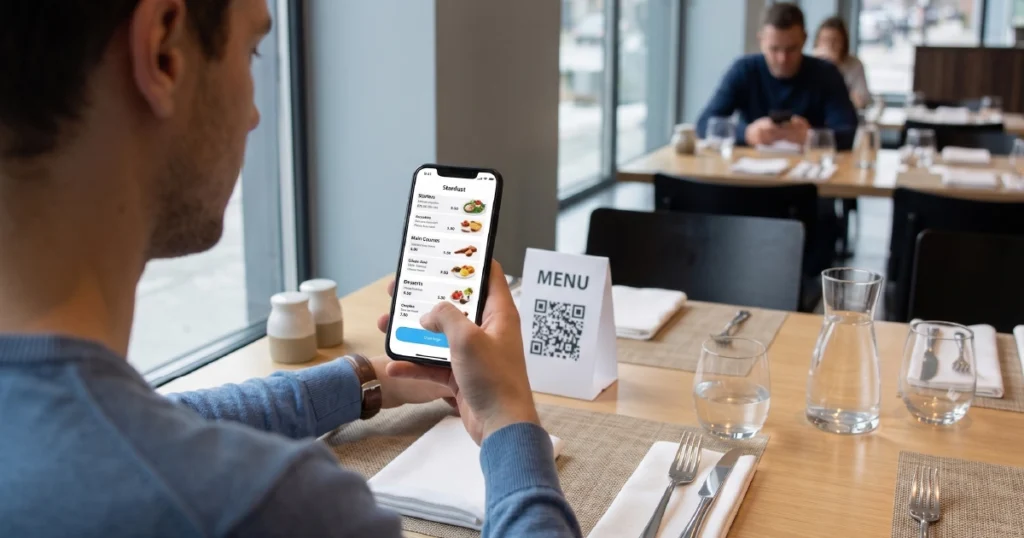

For many dine-in restaurants, the choice often comes down to two practical formats: QR ordering and tablet ordering.
Both systems let guests browse menus and place orders with less staff involvement, but they create very different guest journeys.
That is why many operators compare QR ordering vs tablet ordering before deciding which setup fits their venue best.
The right choice usually depends on three things: service model, guest behavior, and the level of control the restaurant wants over the ordering experience.
What Is the Difference Between QR Ordering and Tablet Ordering
Both QR ordering and tablet ordering are forms of digital ordering systems, but they differ in where the ordering experience happens and who controls the interface.
QR ordering
Guests scan a QR code with their own smartphone, open a digital menu, and place an order directly from their personal device. This makes deployment fast and reduces hardware requirements.
Tablet ordering
Guests use a tablet menu provided by the restaurant, whether the device is already available at the table or brought by staff when needed. The venue controls the device, the interface, and the way the ordering process is presented.
In simple terms, QR ordering prioritizes flexibility and low setup cost, while tablet ordering prioritizes control and consistency. For a broader definition of how these formats fit into one system, see digital ordering systems for restaurants.
How QR and Tablet Ordering Work in Practice
The difference becomes clearer when looking at the actual guest journey.
QR ordering flow
- Guest scans a QR code at the table
- The menu opens in the browser on the guest’s phone
- The guest browses, customizes, and places an order
- Payment is completed on the same device
This approach is explained in more detail in our guide to QR ordering for restaurants.
Tablet ordering flow
- The tablet is provided by the restaurant, either already at the table or brought by staff when needed
- The guest opens the menu on the venue-provided device
- The guest browses, customizes, and places an order
- Depending on the setup, payment may also happen on the tablet
For a fuller breakdown, see our guide to tablet ordering in restaurants.
In practice, the core difference is simple: QR ordering depends on the guest’s own phone, while tablet ordering uses a venue-provided device and gives the restaurant much tighter control over the experience.
QR vs Tablet Ordering: Key Differences
Before comparing details, here is a quick summary:
- QR ordering = flexible and low-cost
- Tablet ordering = controlled and consistent
| Factor | QR Ordering | Tablet Ordering |
|---|---|---|
| Hardware required | None (guest device) | Restaurant-provided tablets |
| Setup cost | Low | Medium |
| Deployment speed | Very fast | Slower due to device setup |
| Guest entry point | Scan and use own phone | Use a restaurant-provided tablet |
| Control over UX | Limited | High |
| Consistency | Variable depending on guest device | High and standardized |
| Upsell potential | Medium | High |
| Maintenance requirements | Minimal | Device charging and management required |
| Best fit | Flexible dine-in and casual environments | Dine-in venues that want experience control |
| Best for | Fast rollout and low-cost digitization | Controlled ordering and consistent table experience |
In short, QR ordering is usually easier to launch, while tablet ordering gives restaurants more control over presentation, flow, and guest interaction. If you want a wider side-by-side view of all three core formats, see QR vs kiosk vs tablet ordering.
QR vs Tablet Ordering Cost
Cost is one of the most practical differences between the two systems.
QR ordering typically has a lower entry cost because it does not require restaurant-owned ordering hardware. Restaurants can roll it out quickly using QR codes and guest smartphones, which makes it an efficient starting point for many venues. For a deeper look at where QR fits best, see what QR ordering for restaurants is and how it works.
Tablet ordering requires upfront investment in devices, charging, storage, and ongoing maintenance. Many restaurants still accept that added cost because tablets create a more controlled and consistent dine-in experience. For a broader view of where tablets work best, see tablet ordering in restaurants.
In other words, QR ordering is usually cheaper to launch, while tablet ordering may justify higher upfront cost when experience quality and consistency matter more.
Pros and Cons of QR Ordering
Pros
- Minimal setup cost with no restaurant-owned ordering hardware
- Fast rollout across one or many locations
- Easy to scale without adding table devices
- Works well in flexible layouts, terraces, and seasonal spaces
Cons
- Depends on guest willingness to scan and use a phone
- Offers less control over the interface and flow
- Performance may vary depending on device quality and connectivity
Pros and Cons of Tablet Ordering
Pros
- Full control over the ordering interface and guest journey
- Consistent experience at every table
- Strong potential for guided upselling
- No need for guests to scan or switch to their own phones
Cons
- Requires device investment and ongoing maintenance
- Needs charging, cleaning, storage, and operational oversight
- Less flexible than QR in changing layouts or outdoor-heavy setups
When QR Ordering Works Better
QR ordering works best when flexibility, speed of deployment, and low operational overhead matter most.
- casual dining restaurants with table service
- venues with outdoor seating or changing layouts
- multi-location businesses that need fast rollout
- restaurants looking for low-cost digital ordering adoption
It is especially effective when guests are already comfortable ordering and paying from their phones.
When Tablet Ordering Works Better
Tablet ordering works better when the restaurant wants a more controlled and uniform dine-in experience.
- full-service and premium casual restaurants
- venues focused on presentation and experience consistency
- concepts that rely on visual merchandising and structured upselling
- operations where removing scan friction is important
It is particularly strong when the restaurant wants guests to enter the same guided interface without depending on personal devices, whether the tablet is kept at the table or handed over by staff during service. For a broader look at when this model fits best, see tablet ordering in restaurants.
Revenue Impact: QR vs Tablet Ordering
Both systems can increase revenue, but they tend to do so in different ways.
QR ordering impact
- can increase order volume by reducing wait time
- can improve table turnover during busy periods
- can make ordering more accessible without adding hardware
Tablet ordering impact
- can increase average check through more controlled upselling
- can create a more immersive and consistent ordering experience
- can reduce ordering friction for guests who do not want to scan
In practice, QR ordering often improves flexibility and service efficiency, while tablet ordering often does a better job of shaping a premium, guided ordering experience.
Can You Use QR Ordering and Tablet Ordering Together
Yes. These formats are not mutually exclusive.
Many restaurants combine both within one digital ordering system.
- QR ordering can support overflow, outdoor seating, and flexible service points
- tablet ordering can support controlled dine-in experiences at core tables or through staff-assisted tablet handoff
When connected through POS integration, both formats can operate as part of one coordinated ordering environment rather than two separate systems.
How to Choose Between QR Ordering and Tablet Ordering
The better choice depends on your operating model and guest expectations.
- type of service and table experience
- importance of low-cost rollout vs controlled UX
- guest willingness to use personal phones
- need for device consistency across service interactions
- staff capacity for device maintenance and management
The more useful question is not which format is better in general, but which one better fits your restaurant’s service style, layout, and guest journey. If you are evaluating that choice more broadly, see how to choose the right ordering system for your restaurant.
Choose QR ordering if you want faster rollout, lower setup cost, and more flexibility across tables or service areas.
Choose tablet ordering if you want tighter control, a more consistent dine-in experience, and stronger guided upselling.
Conclusion
QR ordering and tablet ordering both help restaurants digitize service, but they solve the problem in different ways.
QR ordering is usually the easier way to launch, with lower setup cost and more flexibility. Tablet ordering gives restaurants tighter control, more consistent presentation, and a more guided dine-in experience through restaurant-provided devices.
For some restaurants, QR will be the better fit. For others, tablets will create a stronger guest journey. In many cases, the best result comes from combining both within one connected system. You can also compare this decision against kiosk-based flows in QR vs kiosk vs tablet ordering.
Want to see how QR ordering and tablet ordering can work together in one system?
Explore how Gravy combines QR ordering and tablet ordering in one POS-connected platform to improve speed, consistency, and revenue.


