


For digital ordering to work reliably, a restaurant needs to know more than what the guest ordered. It also needs to know where the order came from, which service model it belongs to, and how it should enter the venue’s existing operational workflow.
Restaurant order routing is the automated system that directs customer orders from various digital channels, such as QR menus, tablets, or self-service kiosks, straight into a restaurant's Point of Sale (POS) system. This technology is vital for streamlining operations by ensuring orders are accurately and efficiently transmitted to the kitchen or bar. Gravy's platform facilitates this process, significantly reducing manual errors and improving service speed for restaurants.
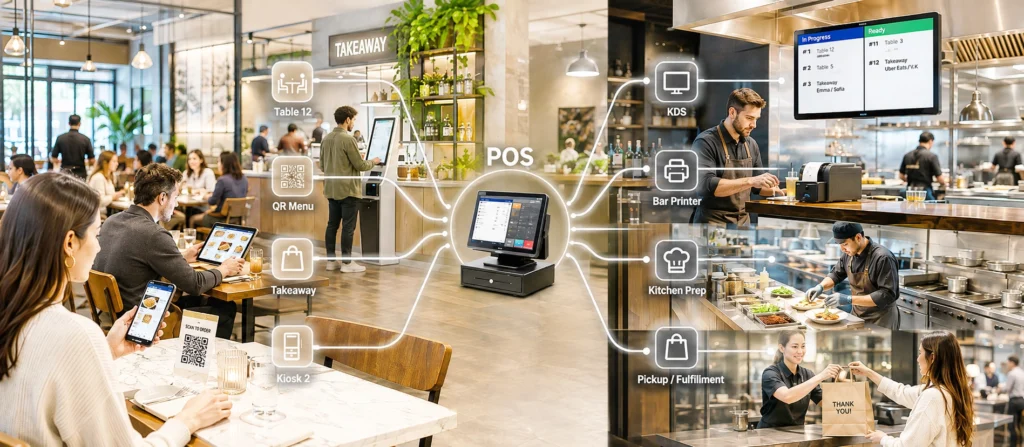
Gravy identifies that source and service context. It can distinguish between QR ordering, guest tablets, QR kiosks, tablet kiosks, individual tables, devices, counters, and pickup points. In a POS-integrated setup, Gravy passes the order and its context to the supported POS system. The POS then applies its own rules for printers, KDS screens, kitchen stations, bars, and other preparation destinations.
Where no direct POS integration is used, the order can follow another configured workflow. It may be managed through Gravy’s own operational tools or passed to a connected restaurant platform that handles downstream routing.
This guide explains how restaurant order routing works, why source identification matters, and what operators should configure and test before launch.
What Restaurant Order Routing Means
Restaurant order routing is the process of moving an order from the guest-facing channel into the systems responsible for registration, preparation, and fulfillment.
In a POS-integrated Gravy workflow, the responsibilities are divided clearly:
- Gravy identifies the order source and attaches the correct service context.
- The POS receives the order and applies its configured internal production rules.
- Printers, KDS screens, bars, and kitchen stations receive the relevant items according to the POS setup.
For example, Gravy may identify that an order came from the QR Menu at Table 12. It passes the order and table context to the supported POS integration. The POS then decides whether drinks go to the bar printer, food appears on the kitchen KDS, and desserts are sent to a separate station.
Gravy does not replace the POS routing logic in this setup. Its role is to ensure that the order reaches the POS with the information required to enter the correct restaurant workflow.
Why the Order Source Matters
Two orders may contain the same items but need different treatment because they came from different service channels.
- A table-service order should remain associated with the correct table.
- A takeaway order may require a queue number and pickup workflow.
- A tablet-kiosk order may belong to a specific counter or fulfillment point.
- A guest-tablet order may need to stay linked to a table, zone, or device.
- An order from a hotel room, lounge, or other service area may require a different service reference.
Useful source information can include:
- ordering channel;
- service model;
- table number;
- device or kiosk identifier;
- counter or pickup point;
- queue or fulfillment type;
- other configured order metadata.
Without this context, the receiving system may get the correct products but lack the information needed to process or fulfill the order properly.
How the Routing Flow Works
1. The Guest Places the Order
The order begins through one of the venue’s configured channels:
- QR Menu for table service;
- Tablet Menu for guest or assisted ordering;
- QR Kiosk for takeaway or counter service;
- Tablet Kiosk for dedicated self-service.
2. Gravy Identifies the Source and Context
Gravy determines which table, device, kiosk, counter, service point, or service model generated the order. It keeps that context attached to the order.
3. The Order Enters the Configured Operational System
The next step depends on the venue setup.
- With a supported POS integration, Gravy sends the order and its context to the POS.
- Without POS integration, the order may be managed through Gravy’s own order environment.
- In another configuration, Gravy can pass the order to a connected operational platform that handles internal routing and printing.
4. The Receiving System Handles Downstream Routing
In a POS-integrated setup, the POS applies its own production rules. It may determine:
- which printer receives each ticket;
- which KDS screen displays each item;
- which bar, kitchen, or preparation station is responsible;
- whether the order follows table-service or takeaway production;
- how items from the same order are divided between departments.
Where another operational platform is used, that platform performs the corresponding downstream-routing role according to its own configuration.
What Gravy Handles and What the POS Handles
| Responsibility | Gravy | POS |
|---|---|---|
| Identify the ordering channel | Yes | Receives the source information |
| Identify the table, kiosk, device, counter, or service point | Yes | Uses the information where supported |
| Distinguish table service, takeaway, and self-service | Yes | Processes the order according to its setup |
| Send the order into the POS | Yes, with a supported integration | Receives and registers the order |
| Route drinks to the bar printer | No, in a POS-integrated setup | Yes |
| Route food to kitchen KDS screens | No, in a POS-integrated setup | Yes |
| Split items between preparation stations | No, in a POS-integrated setup | Yes |
| Apply kitchen production rules | No | Yes |
This distinction matters during implementation. It is not enough for the order to reach the POS. The required source and service information must also be mapped correctly so that the POS can apply its own workflow.
Where no POS integration is used, downstream routing may instead be handled by Gravy’s configured printer or KDS workflow, or by another connected operational platform such as Miley.
For a deeper explanation of the integration layer, read why POS integration matters for digital ordering in restaurants.
How Order Routing Works Without POS Integration
Where no supported POS integration is used, Gravy can connect digital ordering with the restaurant’s operational workflow in several ways.
Depending on the configuration, orders may be managed through the Gravy order environment and sent to connected printers or a KDS. In other deployments, Gravy can integrate with a separate ordering or operational platform that receives the order and handles routing to kitchen printers, preparation stations, or other fulfillment destinations.
For example, the Gravy integration with Miley supports QR and self-service ordering without a direct POS integration. Gravy provides the guest-facing ordering flow and preserves the source and service context, while Miley processes the order and routes it to the configured kitchen, bar, or preparation printers.
This type of setup can be useful when the restaurant’s POS does not support external digital ordering, but another operational platform can act as the bridge between guest ordering and preparation.
The available workflow depends on the connected platform, product version, hardware, region, and venue configuration. Operators should verify:
- which system receives the order;
- which system controls downstream routing;
- how table, kiosk, counter, or pickup information is transferred;
- how orders are printed, displayed, tracked, and fulfilled;
- which statuses and updates are exchanged;
- what fallback process applies if a connected system becomes unavailable.
How Correct Routing Can Reduce Delays
Source-aware routing does not automatically shorten every part of service. Its main value is removing avoidable delays between guest submission and the restaurant’s established operating process.
Less Manual Re-entry
When a digital order reaches the receiving system automatically, staff do not need to read it from another screen and enter it again.
Clearer Table and Fulfillment Context
An order linked to the correct table, kiosk, queue, or pickup point is easier to fulfill than one that arrives without a clear source.
Fewer Manual Sorting Steps
Source information helps prevent table-service, takeaway, and kiosk orders from being mixed into one unclear workflow.
Correct Production Logic
Once the receiving system gets the required context, it can apply the printer, KDS, kitchen, and fulfillment rules already configured for the venue.
More Consistency During Peak Hours
During busy periods, unclear source information creates additional questions for staff:
- Which table placed the order?
- Is it dine-in or takeaway?
- Which counter should handle it?
- Where should the guest collect it?
- Has it already entered the operational system?
Correct source routing reduces the need to resolve these questions manually.
Examples by Service Model
| Service model | What Gravy identifies | What happens next |
|---|---|---|
| Table-service QR ordering | QR Menu, table number, service context | The POS receives the order, associates it with the table, and applies its printer or KDS rules. |
| Tablet table ordering | Tablet, table, zone, or service point | The POS registers the order and follows its internal production workflow. |
| QR takeaway ordering | QR Kiosk, counter, pickup point, or takeaway flow | The POS or another connected operational platform enters the order into the configured takeaway and fulfillment process. |
| Tablet self-service kiosk | Kiosk or device identifier and fulfillment context | The order enters the POS, Gravy workflow, or another connected platform, depending on the deployment. |
| Hybrid service | Guest-facing channel and service context | Digital and staff-entered orders can enter the same operating environment while preserving their source. |
Common Routing Problems
- Wrong table or service point: The order is prepared correctly but cannot be delivered efficiently because the source context is wrong.
- Table service and takeaway are mixed: Staff need to separate orders manually because the service model was not passed correctly.
- Missing operational context: The receiving system gets the products but lacks the fields required to apply the intended workflow.
- Manual re-entry: Staff recreate digital orders because the integration does not deliver them in a usable form.
- Difficult order tracing: Staff cannot see whether the order came from a table, kiosk, counter, or another channel.
- Duplicate orders: Unclear retry or integration procedures result in the same order being registered more than once.
What to Configure and Test
Map Every Ordering Channel
List every way an order can enter the venue and define the service model for each one.
Define the Required Source Context
Confirm which fields each order must carry, such as table number, service zone, device ID, kiosk, pickup point, queue number, or fulfillment type.
Confirm the Receiving-System Mapping
Work with the POS provider, platform provider, or integration team to verify:
- table and service-point identifiers;
- takeaway and dine-in distinctions;
- product and modifier mapping;
- required order fields;
- payment representation where supported;
- duplicate and retry handling.
Verify the Production Setup
Because the POS or another connected operational platform controls printers, KDS screens, and preparation stations, check its production configuration separately.
- Are menu categories assigned to the correct station?
- Do the intended printers and KDS screens receive the order?
- Does the production ticket show the table, queue, or pickup information?
- Do mixed orders reach all relevant departments?
Test Exceptions
Test the full flow from guest submission through registration and production, including:
- incorrect table assignment;
- duplicate submission;
- temporary integration failure;
- printer or KDS failure;
- interrupted payment;
- unavailable items;
- manual correction by staff.
Review the configuration whenever tables, service zones, kiosks, menus, production departments, printers, KDS screens, or fulfillment workflows change.
How to Measure Routing Quality
Useful indicators may include:
- time from order submission to registration in the receiving system;
- number of manually re-entered digital orders;
- orders linked to the wrong table or service point;
- orders missing source or fulfillment information;
- duplicate-order incidents;
- staff interventions required to correct digital orders;
- integration, printer, or KDS failures caused by configuration issues.
Establish a baseline before changing the setup. Otherwise, it may be difficult to determine whether the new configuration reduced delays or simply moved them to another part of the workflow.
How Gravy Fits into the Workflow
Gravy provides the guest-facing ordering layer across QR menus, tablet menus, QR kiosks, and tablet kiosks. It identifies the ordering source, preserves the service context, and passes the order into the configured operational workflow.
In a POS-integrated setup, the POS remains responsible for directing items to its configured printers, KDS screens, bars, and production stations.
Where no supported POS integration is used, downstream routing may be handled through Gravy’s configured order-management, printer, or KDS workflow, or through another connected operational platform such as Miley.
Explore Gravy’s POS Integration, Smart Order Routing, and Miley Integration to see how digital orders can enter the restaurant workflow with the correct source and service context.
Build the Route Around the Existing Operation
Reliable order routing depends on a clear handoff between systems. Gravy needs to identify where the order came from and provide the context required by the restaurant. The receiving system then needs to apply the correct production and fulfillment rules.
When these responsibilities are configured clearly, restaurants can reduce manual re-entry, prevent source-related mistakes, preserve the distinction between service channels, and bring digital orders into the existing workflow with less disruption.
Read more practical guides in our POS & Technology Insights, or explore how Gravy connects QR, tablet, and kiosk ordering with restaurant operations.